Monday, 15 April 2019

Week 11- ARCS Model

                                                                      Related image
Hello, hello, hello everyone! Assalamualaikum 😊
How are you guys doing? I hope everyone is doing great! As usual, here I am, going to update you about what I've learned for this week. 

In the previous week, Madam Azida has assigned us with variety of topics regarding instructional design. Some of them are ARCS, Assure, Dick and Carey and Rapid Prototyping. My teammates and I got a topic about ARCS Model. 

First of all, what is ARCS stands for? It is the initial for Attention, Relevance, Confidence and Satisfaction. 
                
So, basically this model is focus more to the motivational aspects of learning environment. It was created by John Keller. Our lecturer also asked us to create a poster regarding the topic so here it is! 👇

Related imageOther than that, we also played some fun games through Kahoot! The whole class had so much fun while playing it as it creates tense to answer all the questions just within 15 to 20 seconds. 

Personally, I had so much fun and gained new knowledge regarding instructional design models. The knowledge is more understandable when we could play the games together because we had to memorize all the information as everyone wants to win! HAHAHAHAH 😆 All in all, it was a good experience for me to learn something new. Till then, take care everyone! Assalamualaikum & bye 💛

Saturday, 6 April 2019

Week 10- Instructional Design

                                                                 Image result for instructional design
Assalamualaikum & hi once again 👋 
How are you guys doing? I hope you have a good day! Okay, as usual I will tell you about what have I learned for this week. 

Madam Azida has taught us the new topic which is about Instructional Design. First of all, basically instructional design is a systematic process to develop education and training programs in a consistent and reliable fashion. From my understanding, anyone who wants to create instructional design must be someone who can be expert in language and IT design. Moreover, they must create something that involves motivation and students' needs. Ohhh, not to forget that instructional design also involves in CALL as it creates computer course ware for learning. Plus, the course ware acts as the supplement and support the lesson and not as complete replacement. 

Learners needs: The gap between what learners want to get out of education and their current skills and knowledge. Skills or knowledge here means that it is based on the syllabus, survey, free writing and public records. Also, the learning outcomes are focused on whether the objectives are achieved or not as it gives aim to the learning experiences. Not just that, it is more to student oriented instead of teacher oriented. 

There are also approaches or methods to build effective learning solutions and it is stated in a model called as ADDIE MODEL. It includes methods such as Analysis, Design, Develop, Implement and Evaluate. For more understanding, I have provided the details below 👇
                                                           Related image
Madam Azida also asked us to make a poster regarding this topic and my teammates and I have to make a poster and quiz about ARCS. No worries, I will update the poster here in next post, okay? Till now, thank you for your time reading this. Assalamualaikum & bye! 💓

Monday, 1 April 2019

Week 9- Explainer Video: Don't Text & Drive

                                                                        Image result for update gif
Assalamualaikum & hellooo everyone! I'm back with the new update for my learning for this week. As promised, I will show you the result of the explainer video that my teammates and I did for our assignment. 

To be honest, it was not easy to finish up the video. We have experienced some difficulties when we are doing the video as we had some problem with the timeline. However, we were so grateful that we could finish it on time, fuhhh 😅 

It was a good experience for us to learn on how to make an explainer video and be creative, even though actually... we are not that creative! 😆 Not to forget, Madam Azida has showed us all the videos in the class last week so that everyone can watch it. I was truly happy and glad that Madam liked all of our videos! Good job, guysss 😍💪

Alright... so I will give the link of our explainer video entitled "Don't Text and Drive" down below and make sure to watch it, okay? And remember guys, never text while driving, okaayyy? Remember your loved ones always! Okay, till next time... bye! 

Oh yaaa, click on this link to watch the video! 💜
https://www.youtube.com/watch?v=LO1nyMxVd1I

Related image                                                                                                    

Saturday, 23 March 2019

Week 8- Explainer Video

                                                                  
Assalamualaikum & hello guys! How are you guys doing? As for me, I'm already in week 8! Wow, how time flies 😄 okay, so it's time for me to update to you about what I've learned for this week. 

Madam Azida had given us the 2nd assignment which is, we have to create an explainer video or campaign using any animation software such as Powtoon or Animaker. At first, Madam Azida taught us on how to do the video by showing some example of explainer videos on Youtube, so that we can get the idea for our video later. Then, she asked us to prepare the topic for our explainer video.            

Sooo... my teammates and I have decided to have a topic entitled "Don't Text and Drive". 
Image result for dont text and drive animation gif
We have chosen this topic because we think this problem is never being solved until now. People know the effects of texting while driving, yet they tend to ignore it. So, by doing this kind of topic, we hope that we can tell the audience about all the causes and effects of texting and driving. Next, Madam Azida also asked us to do a script for our explainer video so that we can know the flow of our video.
                                  
We have started a bit with our video and I think we need more improvement on making our video looks interesting 😅 It's okay, slowly but surely, guys! 💪 We will work harder to make sure that we create an interesting and creative video, okay? 

And... not to forget, I will post our explainer video next week, so stay tuned! Bye & take care everyone! 💜
Image result for bye cute tumblr gif                                                                                                          

Sunday, 17 March 2019

Week 7- My Life Goals


Hi everyone! As I promised, this is a video about My Life Goals that I created using Powtoon the other day. I'm just new to all this yet I had so much fun while making it although I faced few challenges but it's okay, as long as I learned something new, right? Hehehe. Okay guys, hope you enjoy! 💛🙆


Week 6- What is Powtoon?

Hi & assalamualaikum readers! 💓

Guess what, we are already in week 6 and this week I've learned on how to make video using a video maker which is, Powtoon!

Okay, so first of all, what is Powtoon? Powtoon is the Web-based animation software that allows users to create animated presentations by manipulating pre-created objects, imported images, provided music and user-created voice-overs. To be honest, I was a bit clueless at first when I'm using the software but slowly, I got it. Yeayy! 👏 

With Powtoon, you can create as much as many interesting videos that you want! It has many types of template that you can explore, such as explainer video, marketing video, infographic video, video ads and so many moreeeee! Also, you can use a blank powtoon to create your video as you please 😉  
                                                                      
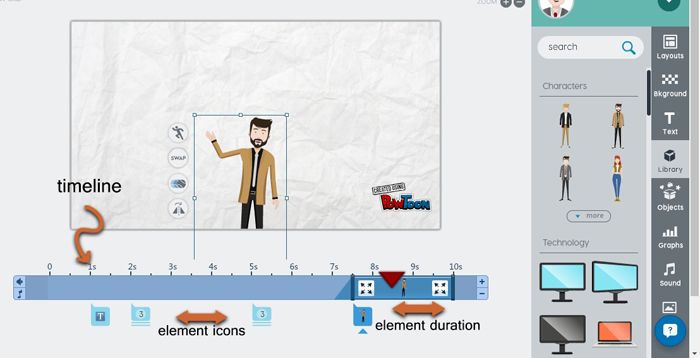
It also has various type of backgrounds, props, characters, background sounds, images and many more elements that you can apply in order to get an awesome video of yourself. You can also learn on how to manage the timeline according with the element icons and duration like how you want it to be.  

                                                    Image result for powtoon

No worries, you can try on yourself by clicking on this link 
https://www.powtoon.com/ 

Okay guys, till next time. Thank you for your time! Xoxo 💓 
                                                                                                                                                     

Saturday, 2 March 2019

Week 5- Podcast Tutorial

Related image

Assalamualaikum & hi! How is your day, everyoneeee? 💛
As for me, it is another update of my learning in week 5 ✌
So, let's begin!

Madam Azida had told us about assignment 2, which we have to create a podcast based on any topics that we want. She taught us that it is important to capturing the ideas of our topic. For example, we have to jot down any ideas or content for our topic so that we know what we are going to say for the podcast. Also, she reminded us that it is also important to utter the words naturally and do not depends on the script too much. Anddddd... don't forget to make it interesting and it doesn't need to be too long! 😂

Another important note is that we have to do some readings and prepare the facts so that we can master the topic that we are going to present. Besides that, if we are confident with the podcast topic, we can convince the listeners easily. 
Some of the in-the-studio tools are:
Related image
  • Sound dampening: Soft furniture
  • Interviewing/co-heating: Skype
  • Live-streaming: Google Hangouts on air
  • Call recording: Google voice
  • Voice mail: Simple voice box                                                                                                                                                                           

We also being taught about how to edit the recording voice using Audacity or Bandlap. For me, it was a good exposure as I've never tried this application before. Thus, if I need to apply this on the future, at least I can get the idea on how to do it later. 

Till next post, bye! 💛